
A working tour of Aurora: the storage design that everything else hangs off, and then the features that only make sense once you understand it. Written from an AWS technical session at the AWS offices in London, provided by my employer in May 2024, with every claim re-checked against where AWS has actually got to, because a fair amount has moved since.
About the diagrams. The architecture diagrams on this page are from an Amazon Web Services technical session on Aurora and remain the property of AWS. I have cropped the branding and used them because they explain the mechanics better than anything I would draw. The commentary, and the corrections where the deck has dated, are mine.
The single most useful thing to understand about Aurora is that it is not PostgreSQL or MySQL on faster disks. The engine is largely stock. What AWS replaced is the storage layer underneath it, and almost every headline Aurora feature is a consequence of that one decision.
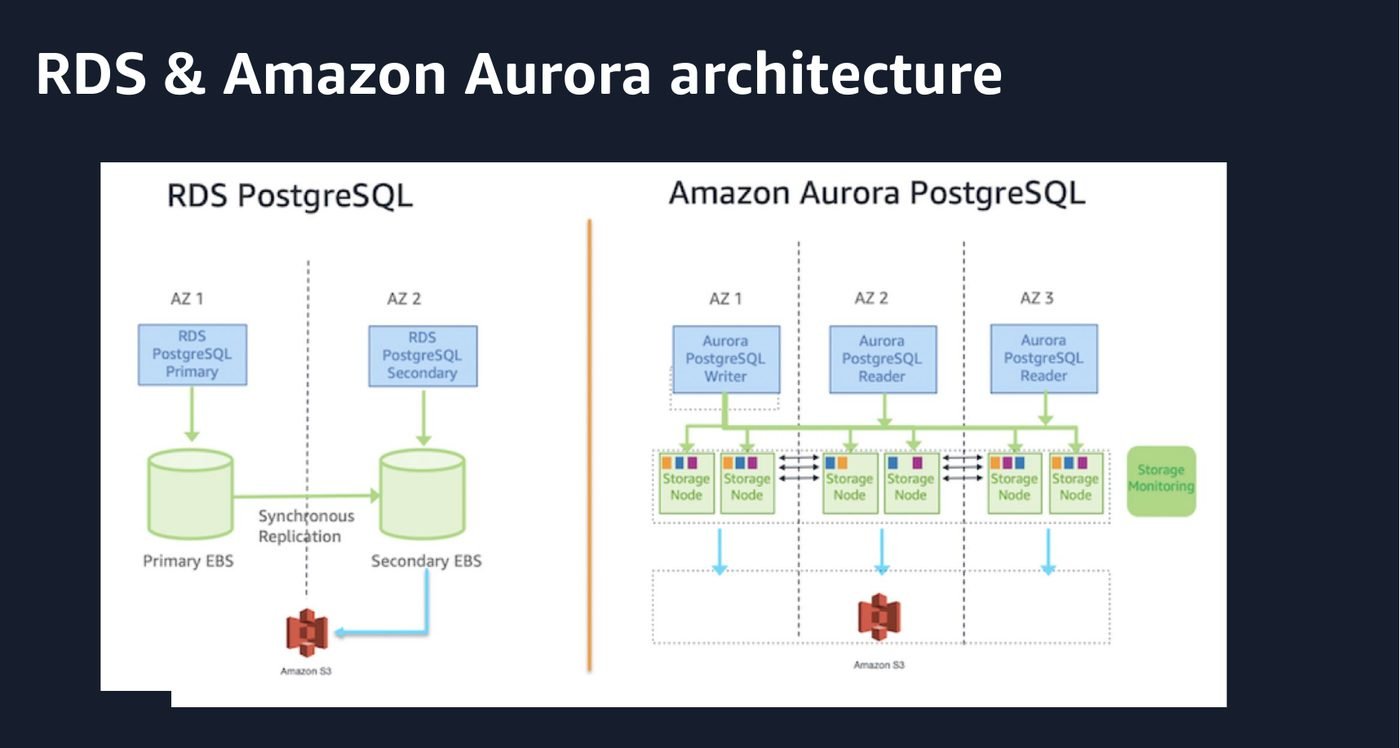
On the left, RDS. A primary writes to its EBS volume, and Multi-AZ keeps a second copy in step by replicating blocks synchronously to a standby's volume. Two databases, two volumes, one of them idle. A failover means promoting the standby.
On the right, Aurora. There is one logical storage volume, spread across three Availability Zones, and every instance in the cluster is attached to the same volume. The writer is not shipping pages to the readers. The readers are reading the same storage the writer just wrote to.
The numbers behind that volume are worth memorising, because they explain the durability story:
| Property | Value |
|---|---|
| Copies of your data | Six, two in each of three Availability Zones |
| Write quorum | Four of six |
| Read quorum | Three of six |
| Segment size | 10 GiB, replicated and repaired independently |
| Maximum volume | 256 TiB on current engine versions, grown automatically in 10 GiB increments |
| Read replicas | Up to 15 per cluster, all on the same volume |
| What you pay for | One copy |
Four of six for a write means you can lose an entire Availability Zone plus one more node and still take writes. Three of six for a read means you can lose an entire Availability Zone and still serve reads. That is not a failover trick, it is just what a quorum buys you, and it is the reason Aurora talks about availability differently from RDS.
The second half of the design is what actually travels over the network. This is the diagram I would show anyone who asks why Aurora is faster.
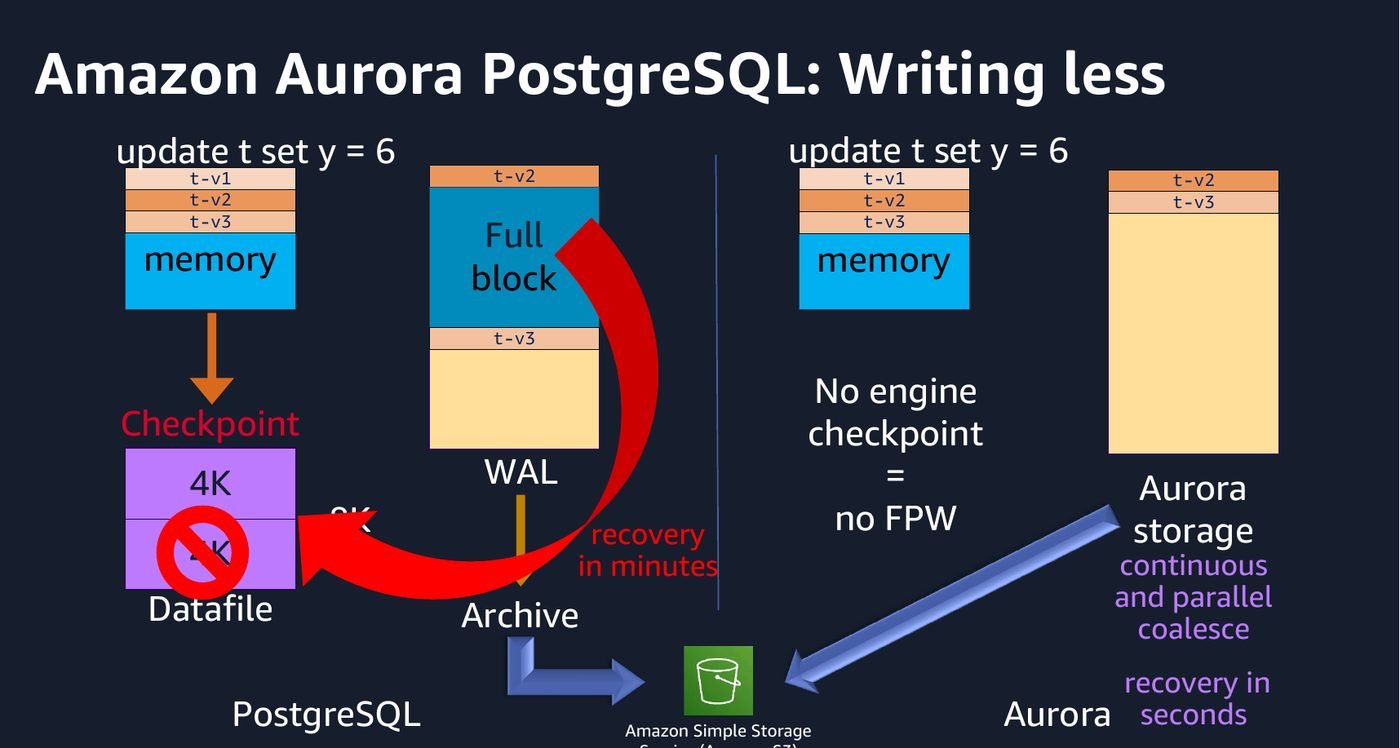
Stock PostgreSQL has to do two expensive things. It checkpoints, which means periodically flushing dirty 8 KiB pages out of shared buffers to the datafile. And because a crash mid-write can tear a page, it writes a full page image into the WAL the first time a page is touched after a checkpoint. That is the full_page_writes setting, and on a write-heavy workload it is a large share of your WAL volume.
Aurora does neither. The engine sends log records to the storage layer and stops there. There is no engine checkpoint, so there are no full page writes to protect. The storage nodes take the log records and materialise pages themselves, continuously and in parallel, in the background.
Why this is the whole trick. A page is 8 KiB. The log record describing a change to it is usually tens of bytes. By pushing page construction down into storage, Aurora replaces a large, bursty, synchronous write of whole pages with a small, steady stream of deltas. Everything else on this page, the fast clones, the read scaling, the recovery time, follows from that.
Recovery is the most visible payoff. Stock PostgreSQL recovers by replaying WAL from the last checkpoint, and that is a single-threaded operation measured in minutes on a busy database. Aurora has no checkpoint to replay from, and storage nodes rebuild pages independently and in parallel, so a crashed instance comes back in seconds. If you have ever sat watching a recovery bar during an incident, that difference is not academic.
Because storage is a log-structured, page-versioned system, making a copy of a database does not have to mean copying any data.
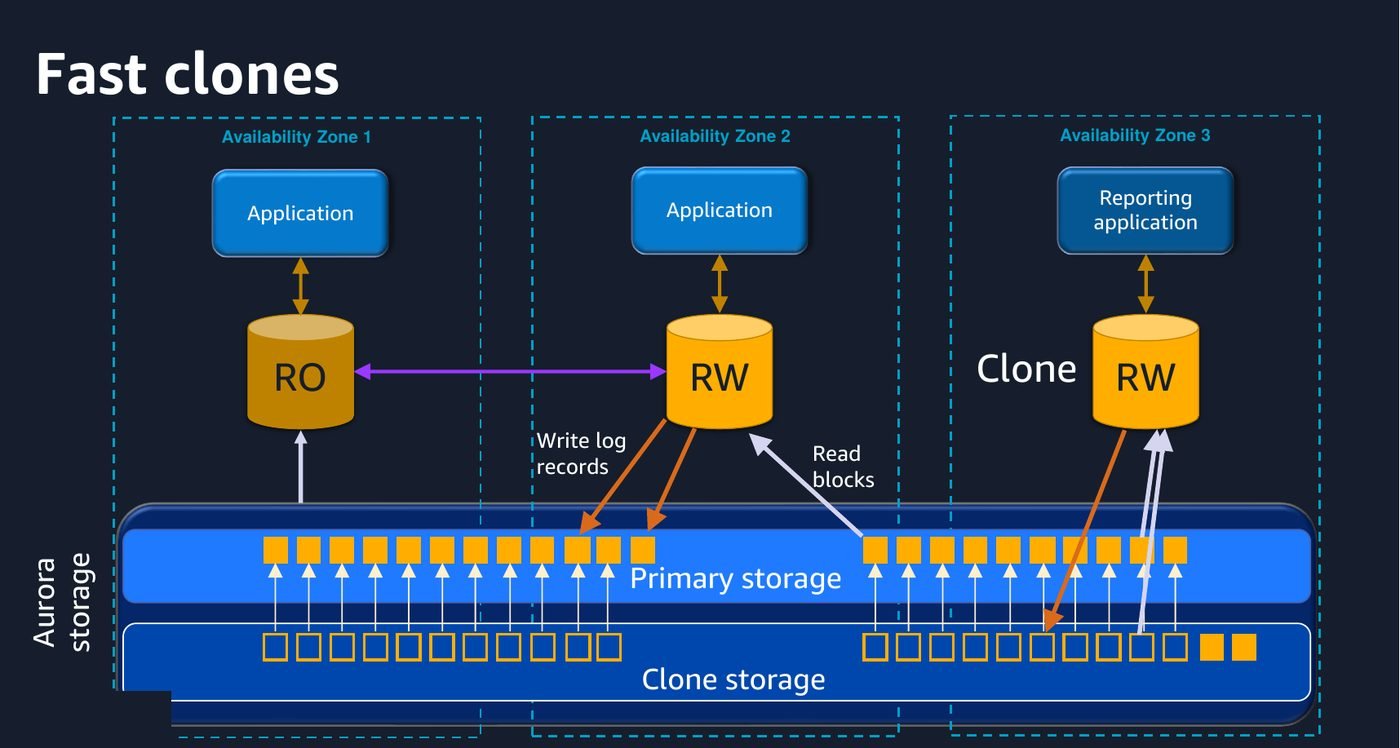
A clone starts as a set of pointers to the source cluster's pages. Nothing is copied. Both clusters read the same blocks until one of them writes, at which point only the changed pages diverge into the clone's own storage. Copy on write, at the storage layer, for a whole database.
In practice this means a full-size production clone in minutes rather than hours, at a storage cost that starts near zero and grows only with what you actually change. For a realistic pre-release test, or for handing an analyst a real dataset they cannot damage, it is the single most useful Aurora feature that people forget exists.
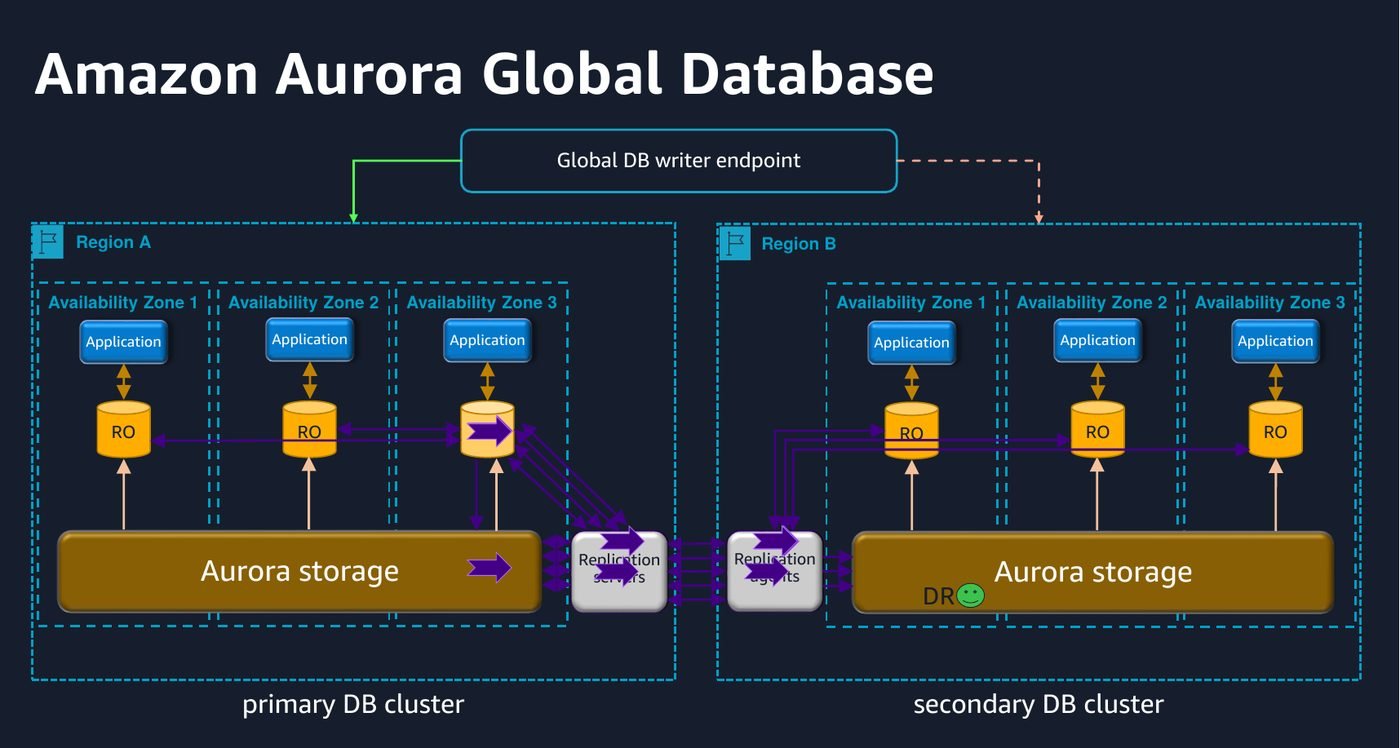
Global Database replicates at the storage layer using dedicated infrastructure rather than the database engine's own logical replication, which is why it can keep cross-Region lag typically under a second without loading the writer. The current shape of it:
--allow-data-loss is the unplanned one, for when the primary Region is gone and you are accepting whatever had not replicated yet.The naming is doing real work there. If your runbook says "failover" for the planned case, someone will eventually run the lossy command during a drill.
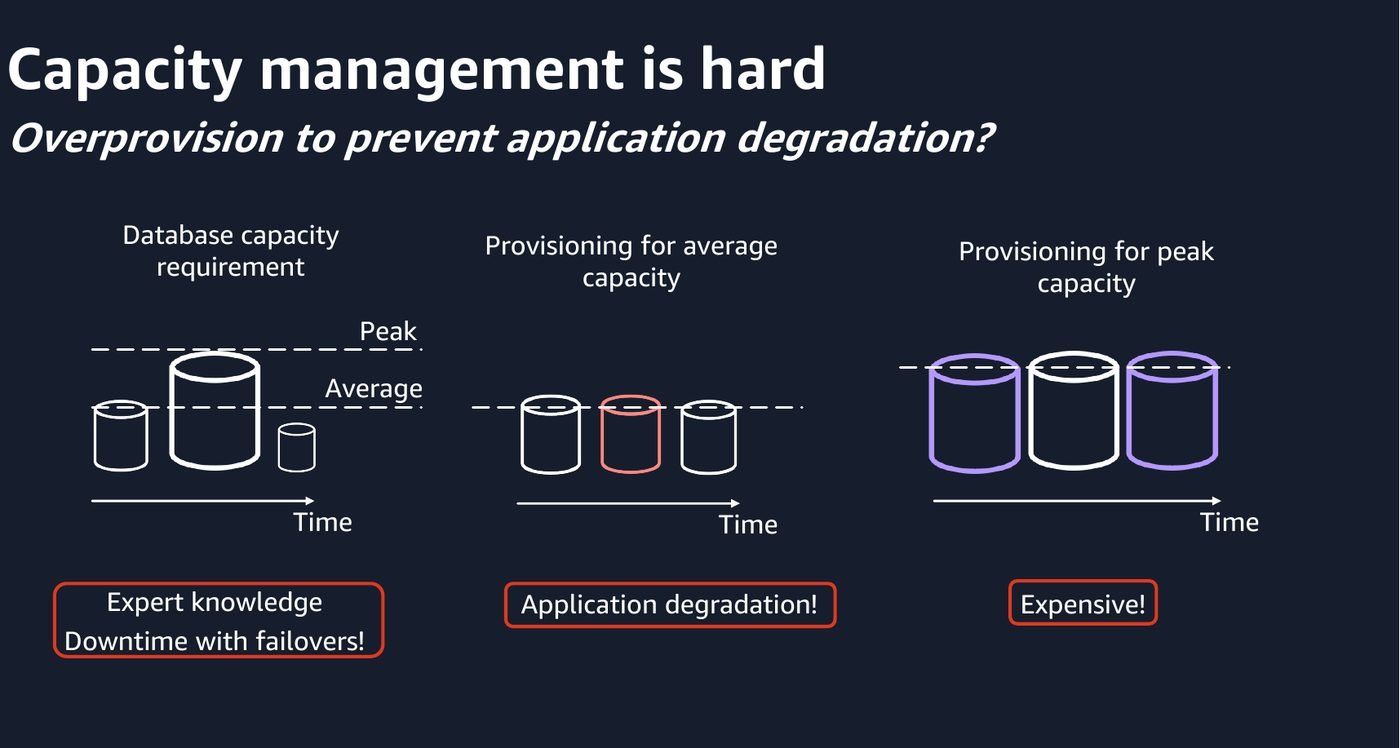
This slide is the honest framing of why serverless databases exist. Provision for the average and you are degraded at peak. Provision for peak and you pay for headroom you use twice a year. Either way, changing your mind means an instance class change and a restart.
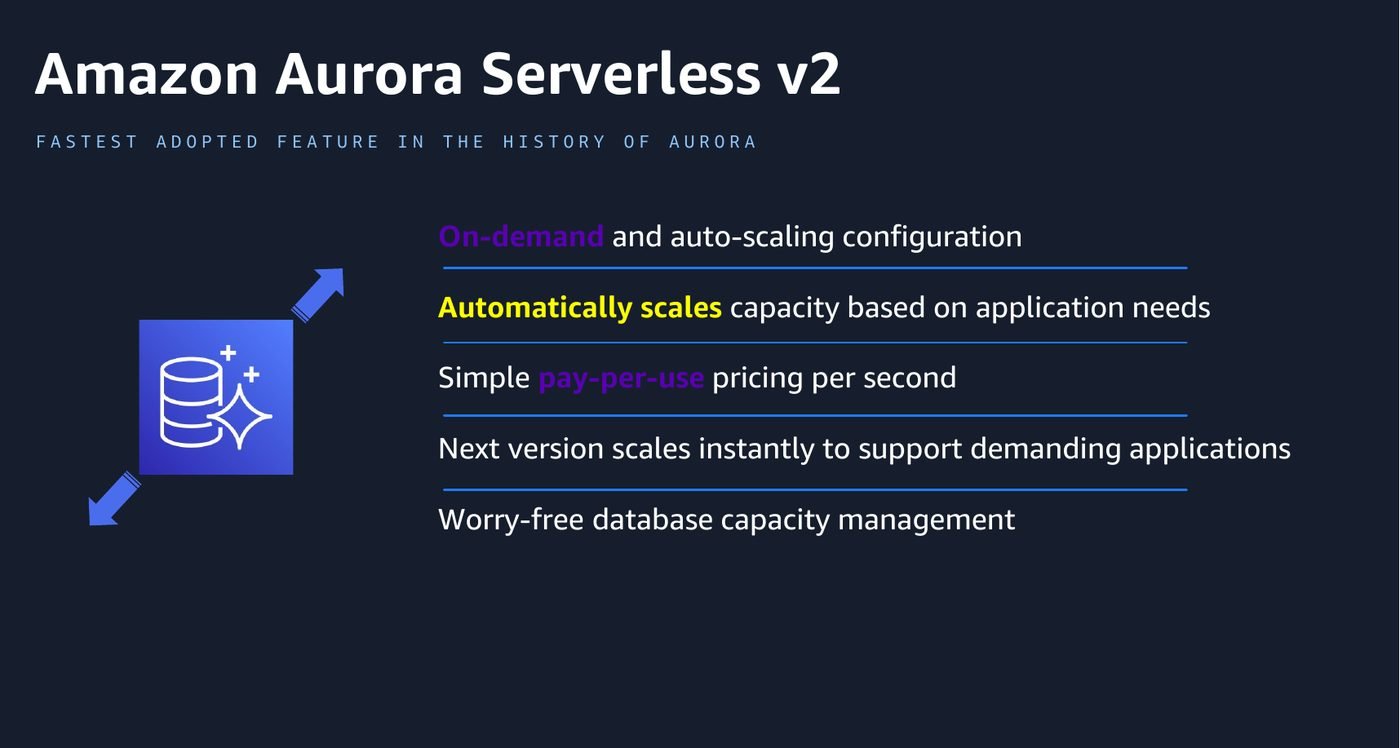
Serverless v2 measures capacity in Aurora Capacity Units. One ACU is roughly 2 GiB of memory with proportional CPU and network, so a 64 ACU ceiling is about the same memory as a db.r6g.4xlarge. The range now runs from 0 to 256 ACUs, billed per second.
The part that is genuinely clever, and that people miss, is what happens to the buffer pool when capacity moves.
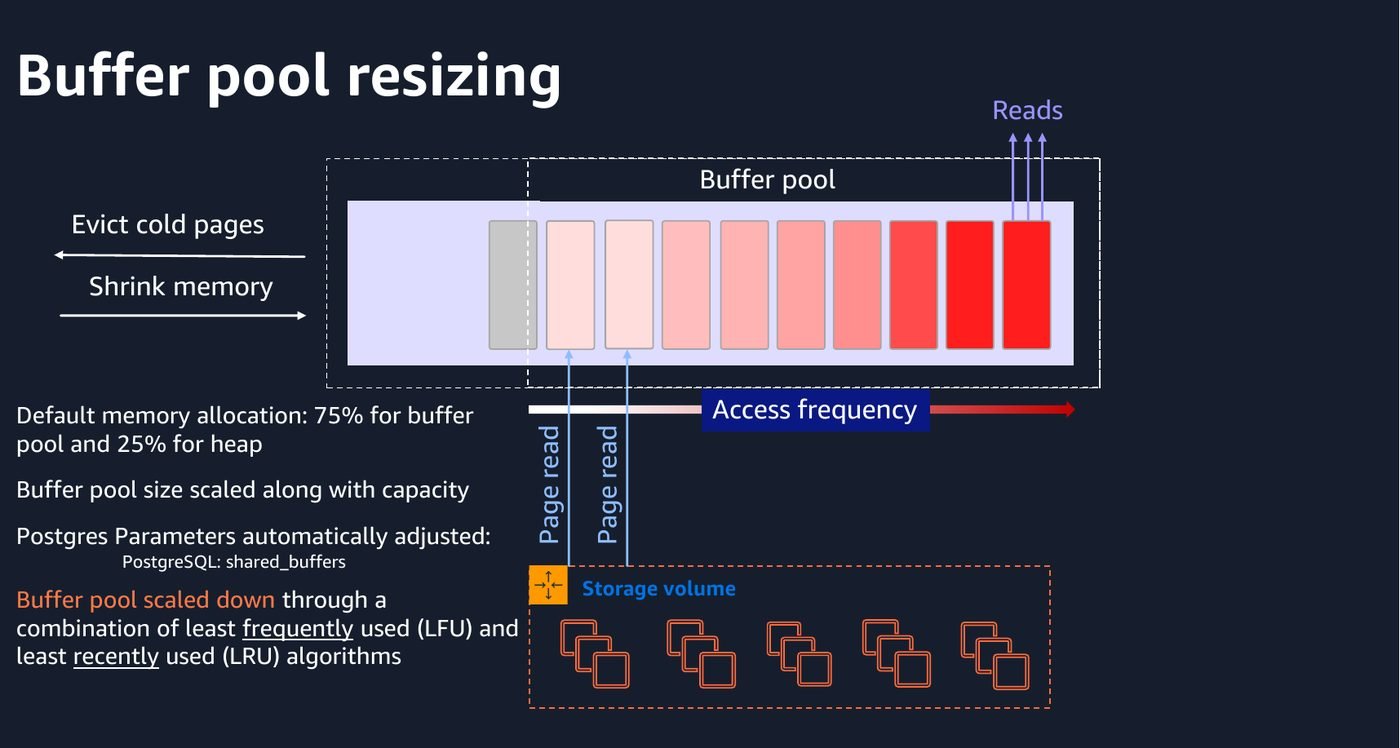
In stock PostgreSQL, shared_buffers is fixed at startup. Changing it means a restart. Aurora Serverless v2 scales the buffer pool with capacity while the instance stays up, evicting the least frequently and least recently used pages as memory shrinks. That is why scaling down does not cost you your whole cache, and it is why the feature is usable at all.
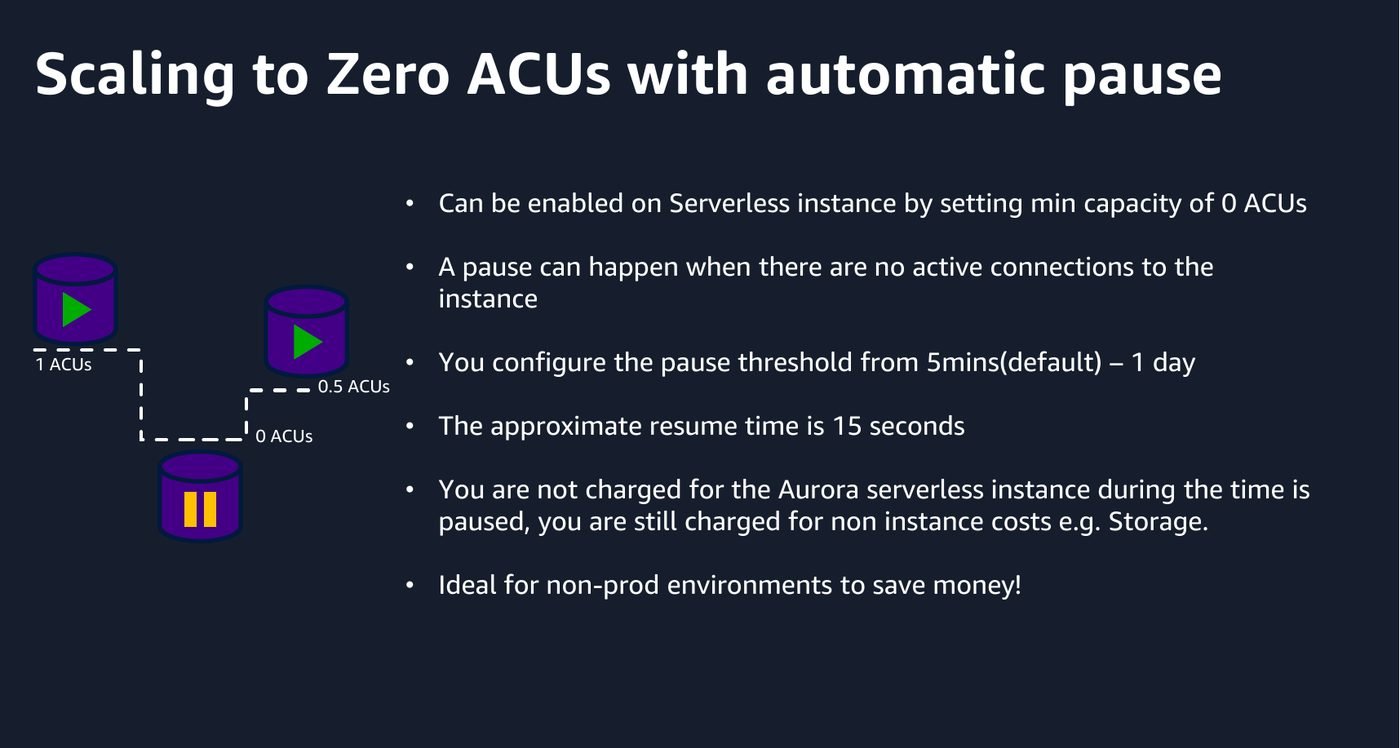
Set the minimum capacity to 0 ACUs and an idle instance pauses completely, resuming in roughly fifteen seconds on the next connection. You keep paying for storage, but not for compute. For development and test clusters that sit idle overnight and at weekends, that is most of the bill.
Two things to know before you rely on it. First, it will not pause while anything is holding a connection open, and RDS Proxy holds connections open, so a cluster behind a proxy never sleeps. It also will not pause if the cluster is part of a Global Database or has certain replicas attached. Second, and this one is easy to trip over: on PostgreSQL, setting a minimum of 0 or 0.5 ACUs caps max_connections at 2,000. If you are sizing a connection pool against a higher number, check this.
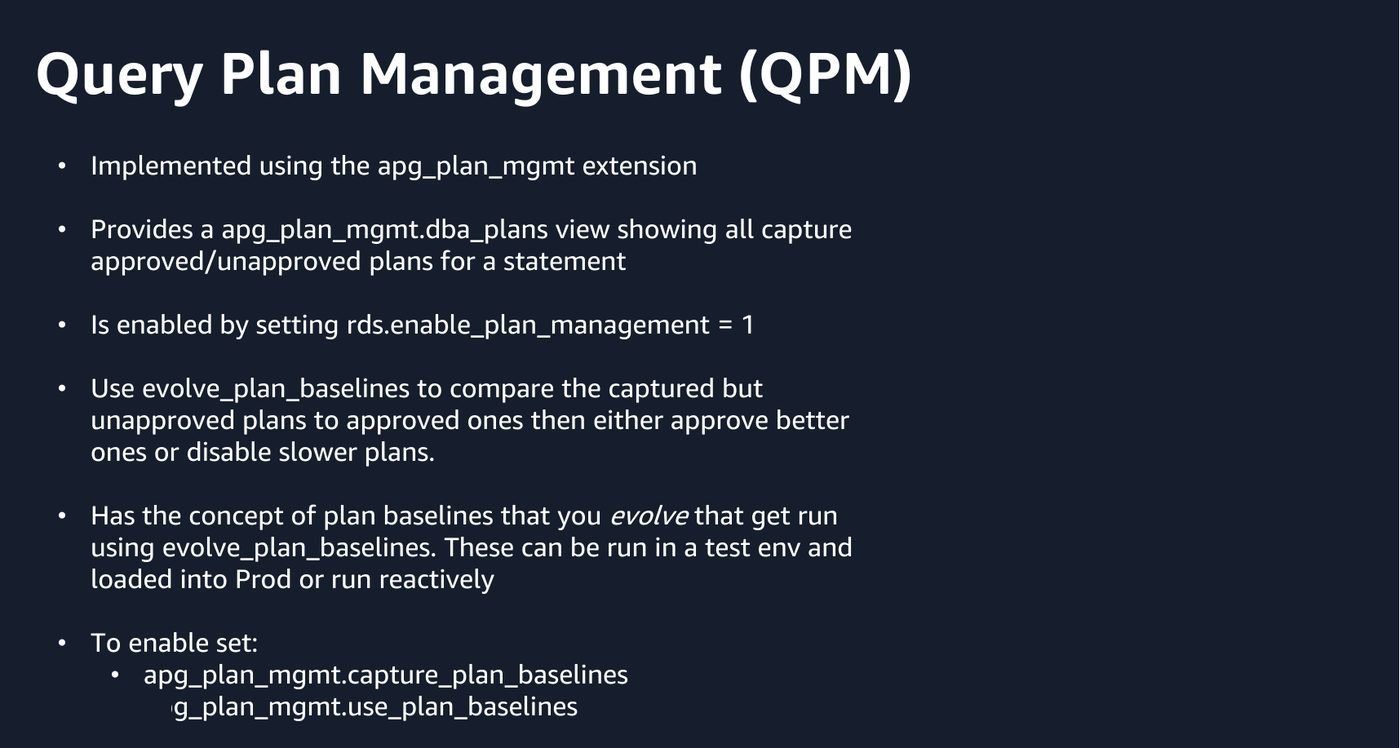
Plan instability is the failure mode where nothing changed except the statistics, and a query that ran in 40 milliseconds yesterday is now doing a sequential scan. Aurora PostgreSQL ships the apg_plan_mgmt extension to pin this down: capture the plans a statement uses, approve the good ones, and the planner will not silently switch to something else.
-- capture plans as they are used
SET apg_plan_mgmt.capture_plan_baselines = automatic;

-- and make the planner honour what has been approved
SET apg_plan_mgmt.use_plan_baselines = true;

-- what has been captured, and what state is it in
SELECT sql_hash, plan_hash, status, total_time / execution_count AS avg_ms
FROM   apg_plan_mgmt.dba_plans
ORDER  BY avg_ms DESC;
The workflow that actually pays off is the one people skip: capture in a test environment, run evolve_plan_baselines against the captured set to compare unapproved plans with approved ones on real timings, then promote or reject deliberately. Turning capture on in production and never looking at the table again is not plan management, it is just overhead.
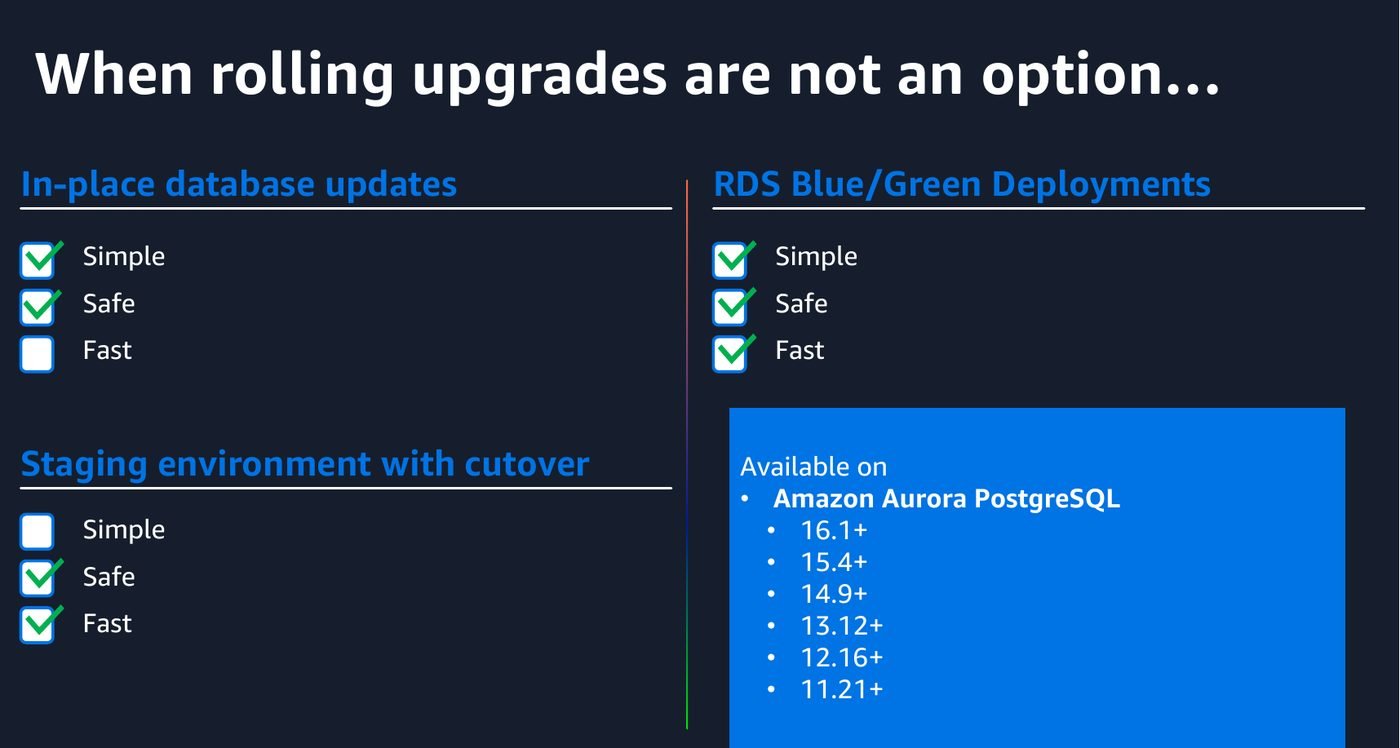
This is the clearest slide in the deck. Upgrading in place is simple and safe, and it takes your database down for the duration. Building a parallel environment yourself and cutting over is fast, and it is a large amount of fiddly work that you will get subtly wrong. Blue/Green is AWS doing that work for you.
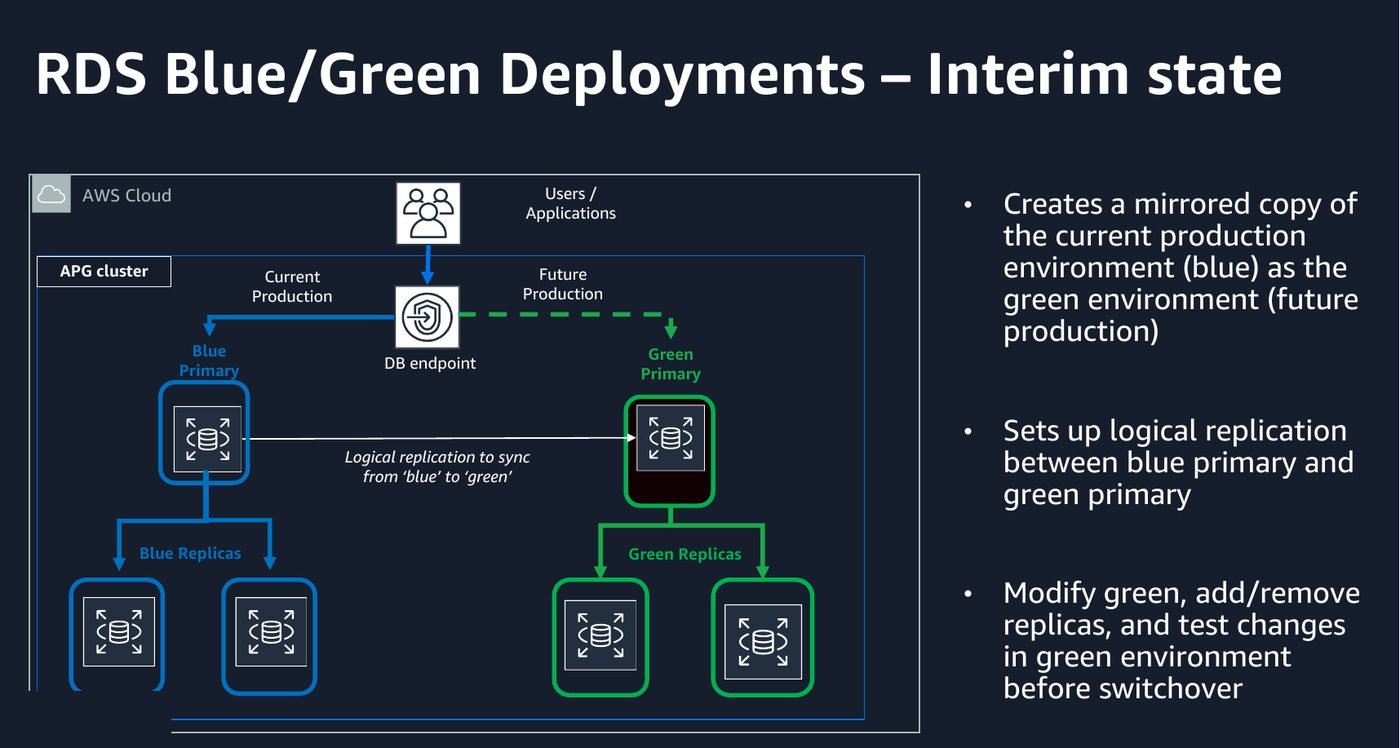
It copies the whole topology, cluster and instances and parameter groups and replicas, then keeps green in sync with blue by logical replication. You upgrade the engine, change parameters, change instance classes, and test against green while blue carries on serving production. Then you switch over.
-old1 suffix, so you can go back and investigate rather than guess.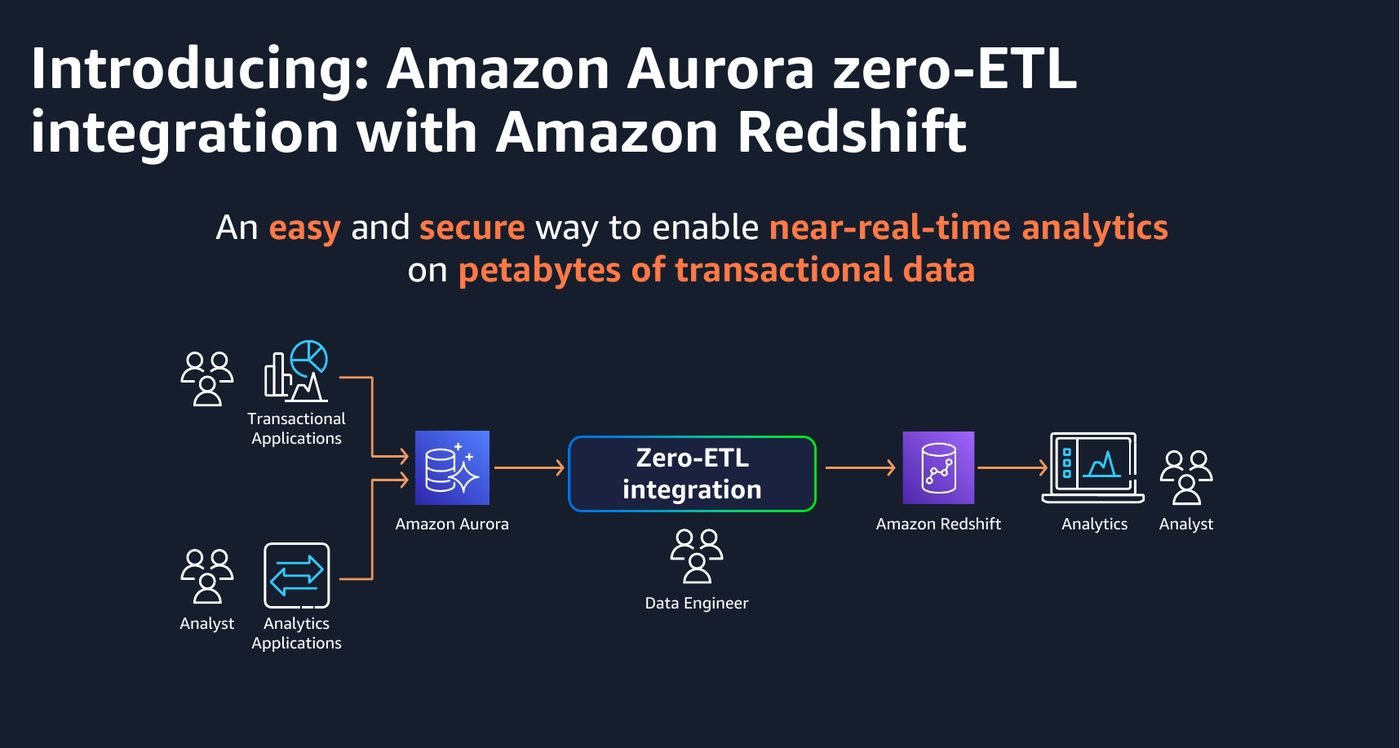
The problem this solves is one I have built the manual version of more than once: transactional data in Aurora, analysts who need it in the warehouse, and a pipeline of change capture, staging, transformation and load in between. That pipeline is real engineering with real failure modes, and none of it is differentiating work.
Zero-ETL is a managed integration that replicates committed transactions into the analytics target in near real time. What has changed since this deck was given is what you can point it at:
The honest caveat is that zero-ETL replicates, it does not transform. If your warehouse model differs from your transactional model, and it usually should, you still need modelling on the far side. What it removes is the movement, not the thinking.
Aurora bills storage two ways, and choosing wrong is one of the easier ways to overspend.
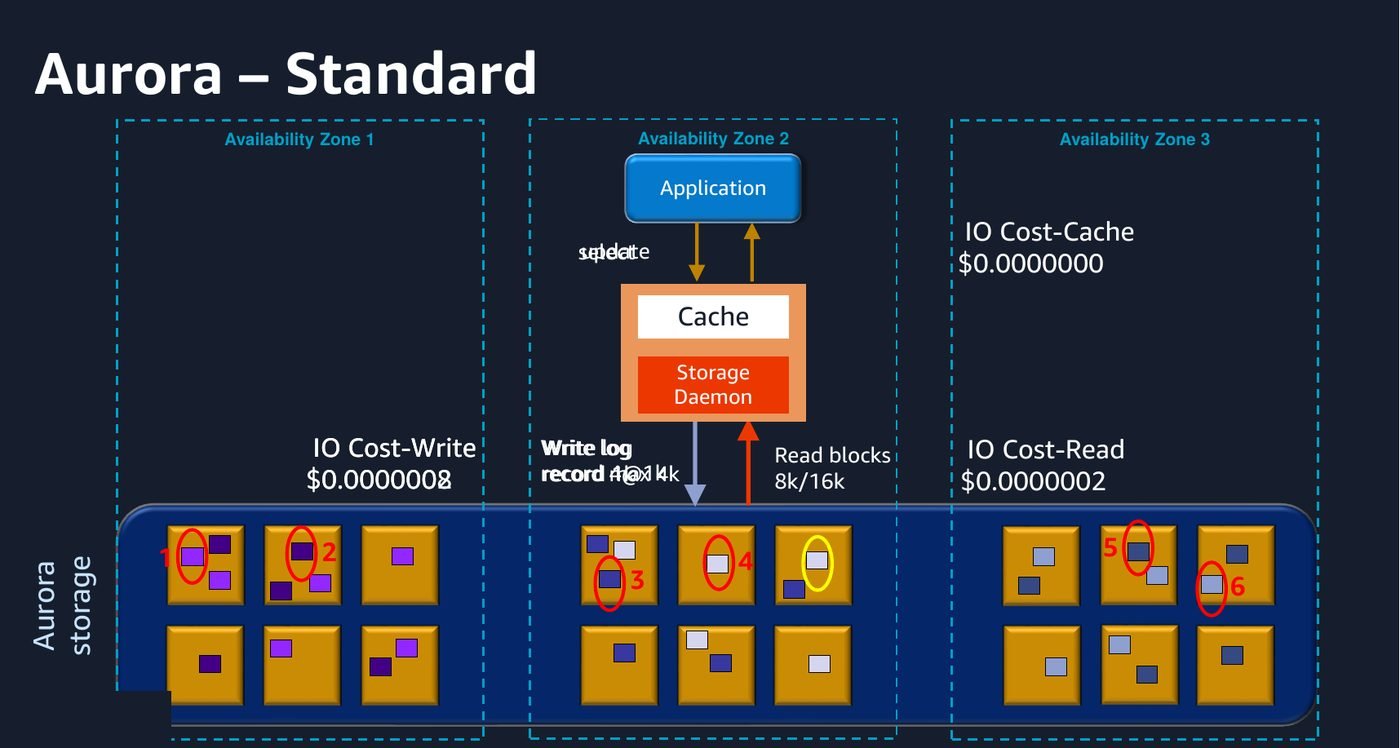
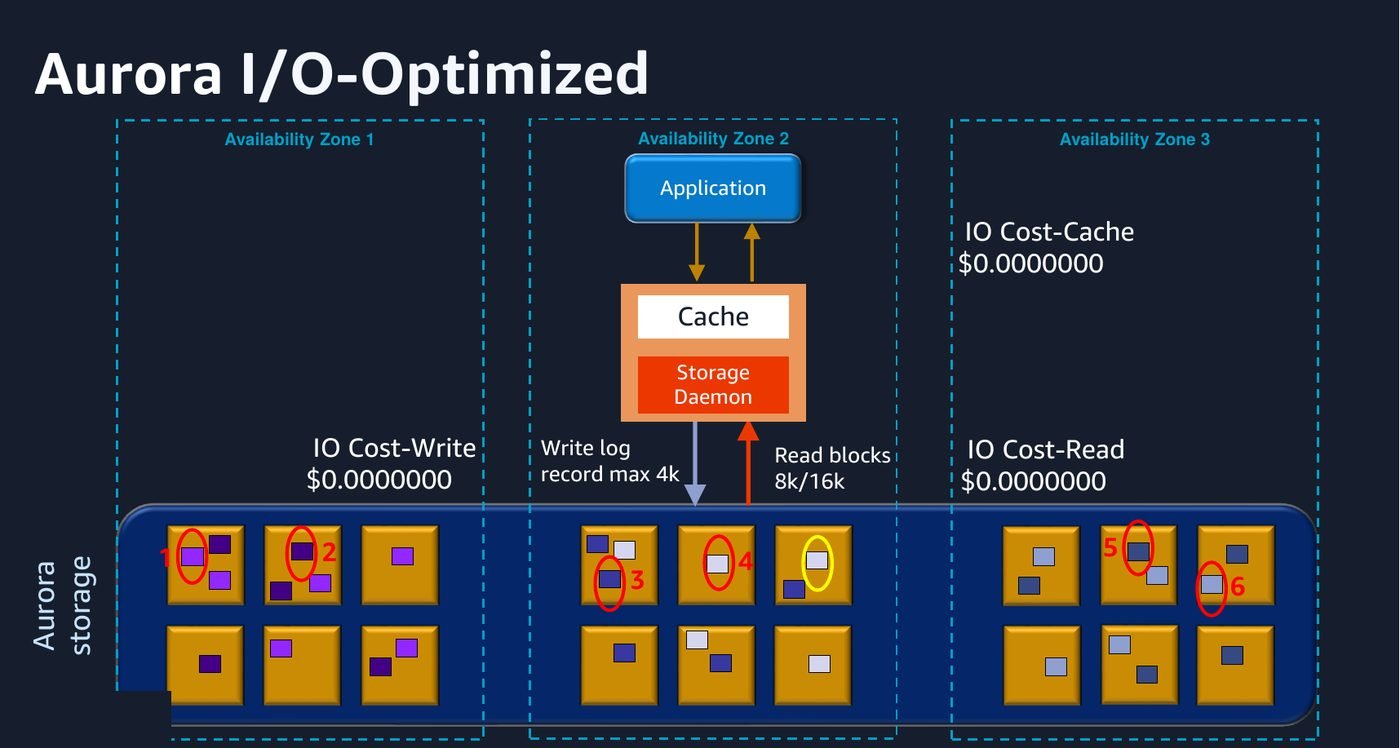
Standard charges you for compute, for storage, and for every I/O operation. I/O-Optimized charges more for compute and storage and does not bill I/O at all. The rule of thumb AWS gives, and which matches what I have seen, is that if I/O is running at more than about 25 per cent of your total Aurora spend, I/O-Optimized is cheaper, and it makes the bill predictable regardless.
The operational detail worth remembering: you can switch a cluster from Standard to I/O-Optimized at any time, but you can only make that switch once in a calendar month. You can switch back whenever you like. So measure first.
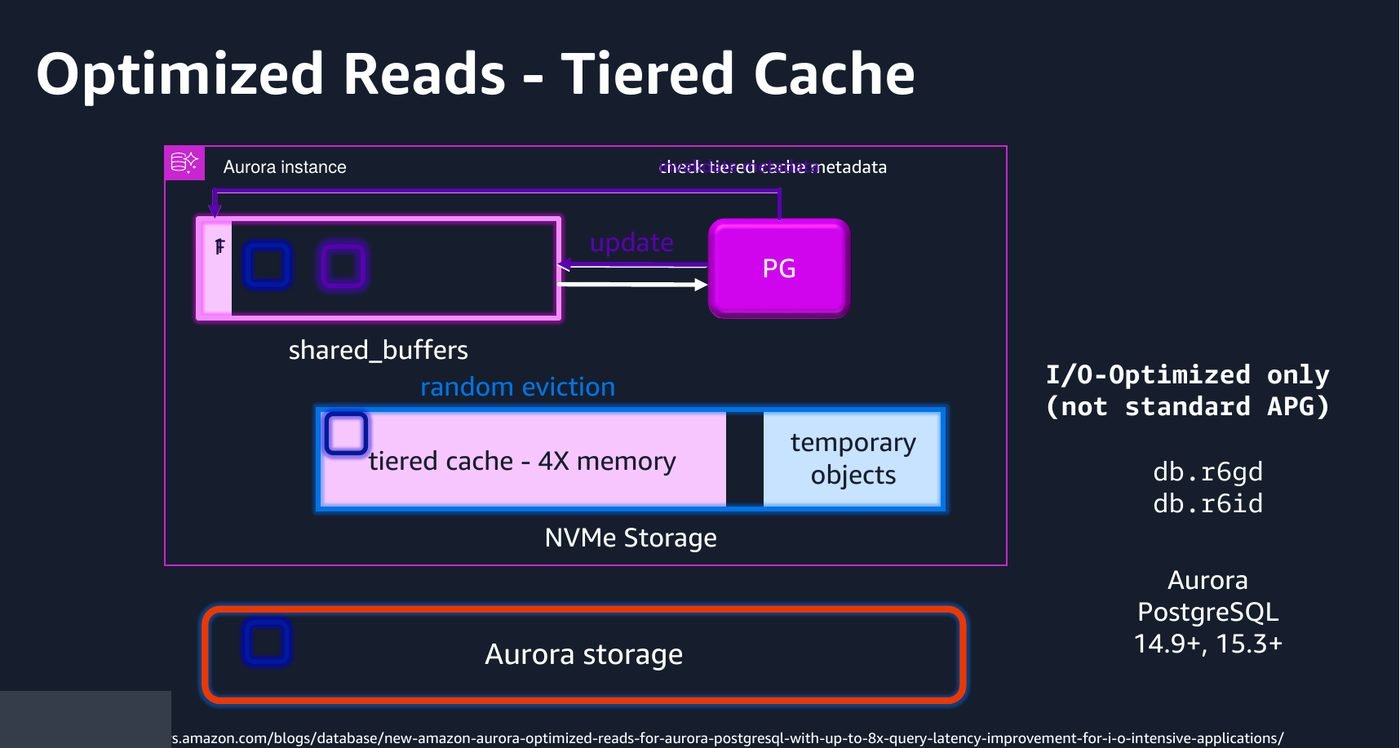
Optimized Reads is what you get on the NVMe-backed instance classes, and it is two separate things wearing one name:
It runs on r6gd, r6id and the Graviton4 r8gd classes, and it is on by default when you pick one of those. There is nothing to enable. If your working set is larger than memory, this is close to free performance, and the newer r8gd instances push it further again.
Everything above still has one writer. Two AWS answers to that, and they are not the same product.
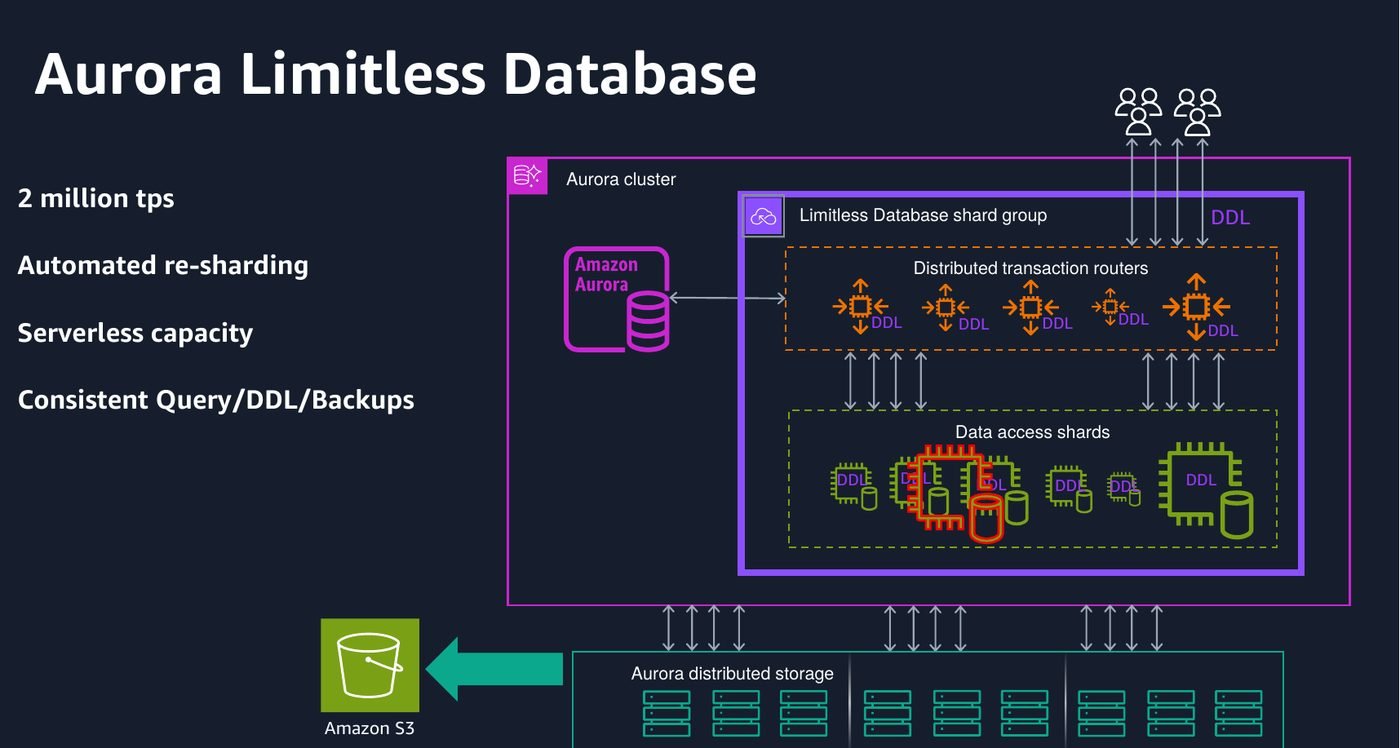
Limitless keeps Aurora PostgreSQL and shards it horizontally behind a single endpoint. Transaction routers accept your connection and route statements to data shards, which hold non-overlapping ranges of the shard key. Re-sharding is automatic as data grows.
The design point to grasp is the table types, because they decide whether it works for you. Sharded tables are distributed by shard key. Reference tables are replicated in full to every shard so joins stay local. Standard tables live on a single shard. Get the shard key wrong, or co-locate the wrong things, and you turn every query into a cross-shard operation, which is exactly the cost you sharded to avoid.
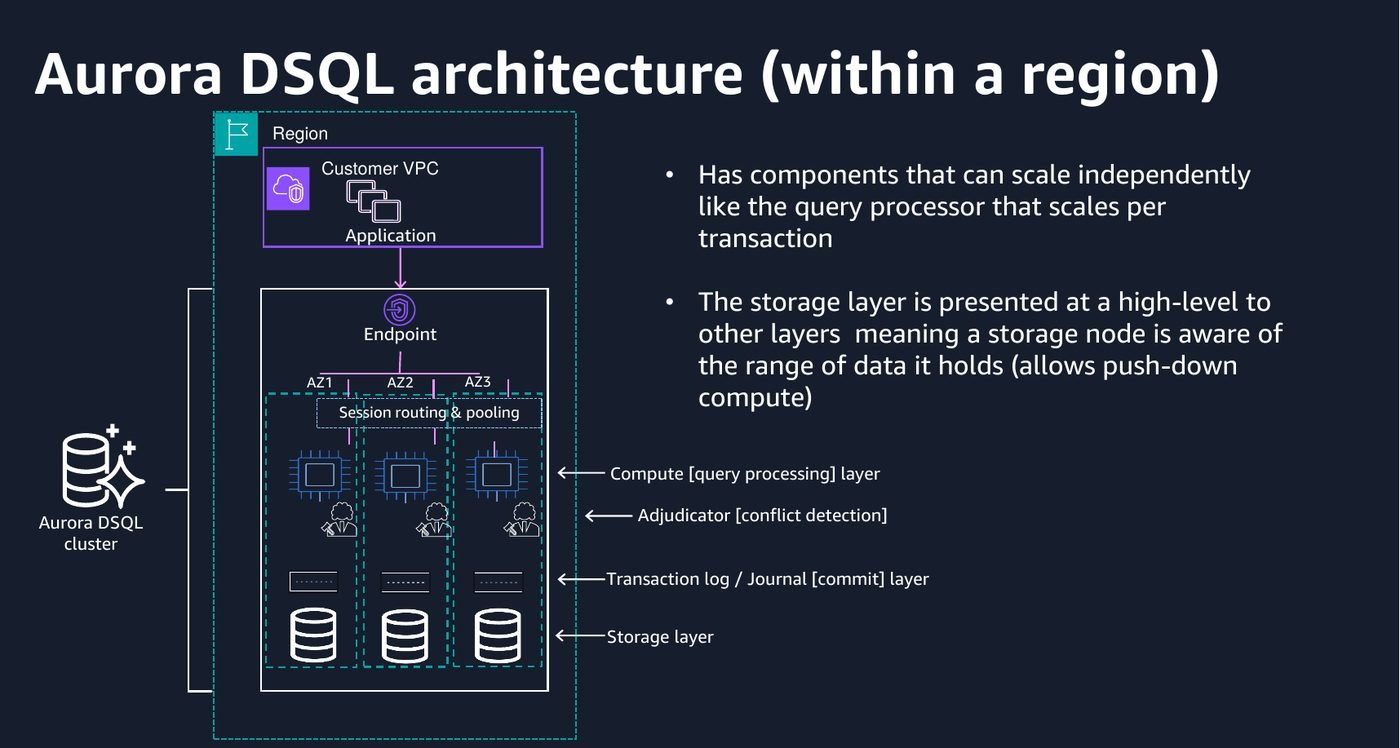
DSQL is the more interesting one, and the deck caught it while it was still in preview. It went generally available in May 2025 and has been expanding Regions steadily since, reaching around twenty by mid 2026.
It is not Aurora PostgreSQL with more nodes. It is a ground-up distributed SQL database that speaks PostgreSQL, currently at PostgreSQL 16 compatibility. The architecture pulls apart the pieces a normal database fuses together: a query processor that scales per transaction, an adjudicator that decides conflicts, a journal that is the durability boundary, and a storage layer that can push computation down.
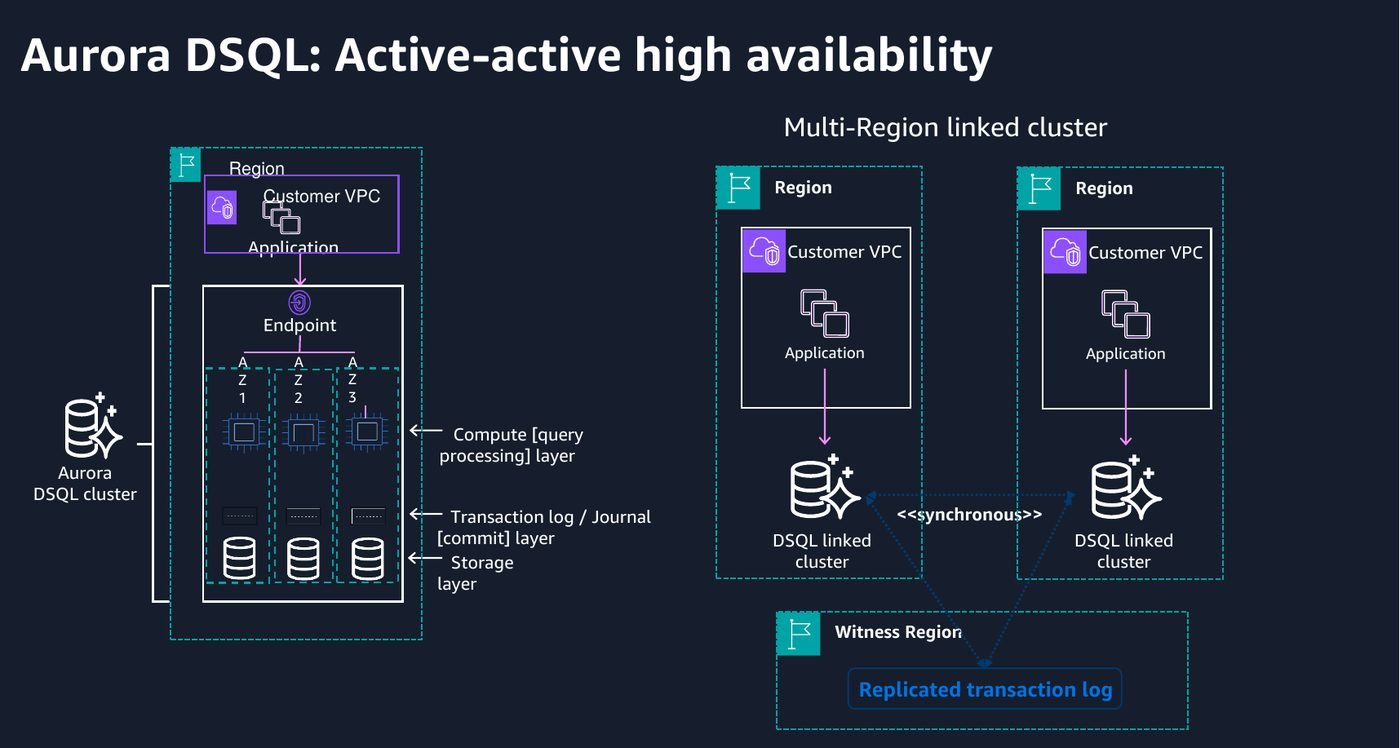
Multi-Region DSQL is genuinely active-active. Both endpoints take writes, with a third witness Region holding the replicated log so a quorum survives losing either one. AWS publishes 99.99 per cent availability for a single-Region cluster and 99.999 per cent for multi-Region, which is a different conversation from a writer and a standby.
The constraints matter as much as the capability:
The deck is from 2024. This is what I had to correct while writing, which is a decent snapshot of how fast this service changes.
| Area | In the deck | Now |
|---|---|---|
| Aurora DSQL | Preview | Generally available since May 2025, roughly twenty Regions |
| Serverless v2 ceiling | 128 ACUs | 256 ACUs |
| Scaling to zero | Newly announced | Established, with the connection cap and RDS Proxy caveats now well documented |
| Zero-ETL targets | Redshift | Redshift and SageMaker Lakehouse, both engines |
| Optimized Reads | r6gd and r6id | Graviton4 r8gd added, with a further step up in throughput |
| PostgreSQL versions | Up to 16 | Up to 18, from June 2026. PostgreSQL 13 left standard support in February 2026 |
PostgreSQL 18 on Aurora is worth a look on its own: B-tree skip scans, optimizer statistics that survive a major version upgrade, and parallel logical replication for large transactions. The statistics one quietly removes a familiar upgrade-day problem, where the database comes back up and immediately picks terrible plans because it has forgotten everything it knew.
Unless you need an engine or extension Aurora does not carry. The recovery time and read scaling alone are worth it.
A full-size clone costs minutes and almost nothing. There is no good reason to test a migration against a subset.
Above roughly a quarter of spend on I/O it pays. You only get one switch a month, so look at the bill first.
Under a minute of switchover, the old environment kept for investigation, and guardrails that stop rather than hope.
Just remember it will never pause behind RDS Proxy, which is how most people discover the bill has not moved.
Optimistic concurrency and no sequential keys are application decisions, not configuration. Retrofitting is painful.