
Moving an on-premises trading database estate onto Amazon Aurora with AWS SCT and DMS: schema conversion, full load plus CDC, wave planning, and a cutover measured in minutes rather than days.
This project moved a trading data estate off an on-premises database platform and onto AWS. The source was a mix of SQL Server and Oracle instances owned by a separate database operations team; the target was Amazon Aurora inside a private VPC. Because the engines differed on either side, this was a heterogeneous migration: schema conversion with the AWS Schema Conversion Tool (SCT), then data movement with AWS Database Migration Service (DMS) using a full load followed by change data capture (CDC).
The environment itself, meaning the VPC, subnets, replication instance, endpoints, IAM roles and the SCT host, was defined in Terraform, so each wave could be stood up, torn down and rebuilt identically rather than clicked together by hand.
Three constraints shaped every decision that follows: the source had to stay live and writable until the moment of cutover, the migrated data had to reconcile exactly, and the source data had to remain retrievable for years afterwards for audit and regulatory purposes.
Why it matters: DMS moves rows. The project is really about everything around it: sequencing, prerequisites on systems you do not own, and proving the numbers afterwards.
The shape is simple: a replication instance in private subnets, a source endpoint pointing back on-premises and a target endpoint pointing at Aurora. The replication instance sits in the middle, reads from the source, and writes to the target.
What is not simple is the link between the two. Bandwidth and latency become real numbers on a project like this, because a multi-terabyte full load over a constrained connection can run for days, so both the link and the replication instance have to be sized for it. For genuinely large initial loads the bulk can be seeded offline with AWS Snowball, letting CDC catch up over the wire afterwards.
Firewalls have to cooperate in both directions: the AWS side must let DMS reach the source database port, and the on-premises firewall must allow the inbound connection from AWS. Connectivity is either Direct Connect or a Site-to-Site VPN, and that choice comes back later in the encryption section.
For the Windows host running SCT I skipped the usual NAT gateway and bastion pattern and used SSM Session Manager, with Fleet Manager Remote Desktop port forwarding for the GUI. No public IP, no inbound ports open, and session activity logged by default.
Why it matters: Connectivity and firewall changes usually sit with network and security teams, so they are the longest lead item on the plan. Start them before anything else.
CDC does not come for free. The source database has to be configured to expose its change stream, and on this project that work sat with the DBA and database operations team rather than with me.
For Oracle that means the database is switched into ARCHIVELOG mode, supplemental logging is enabled, and a migration user is created with the grants DMS needs to read the redo stream. For SQL Server it is the equivalent story: the right recovery model and access to the transaction log.
None of this is difficult, but all of it happens on a system another team owns and operates. It needs a change request, a window, and someone on the other side who understands why you are asking.
Why it matters: A DMS task with full load plus CDC will start happily and then fail to replicate changes if the source logging prerequisites were never applied. Confirm them before the first wave, not during it.
AWS SCT is a desktop application rather than a managed service, so it needs somewhere to run: a Windows EC2 instance inside the VPC, reached through SSM Fleet Manager rather than RDP over the internet. From there it connects to both ends of the migration. It reaches the source over its JDBC driver, with the driver path and SSL settings configured inside the project, and the Aurora target through the cluster writer endpoint. I ran MySQL Workbench on the same instance to verify the target independently of SCT, and the target user is granted permission to write the converted schema before any conversion is attempted.
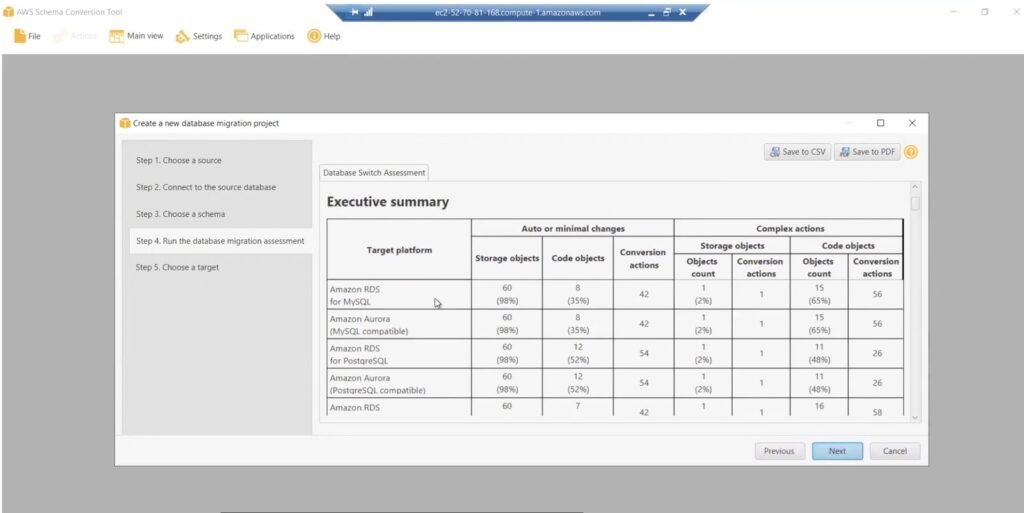
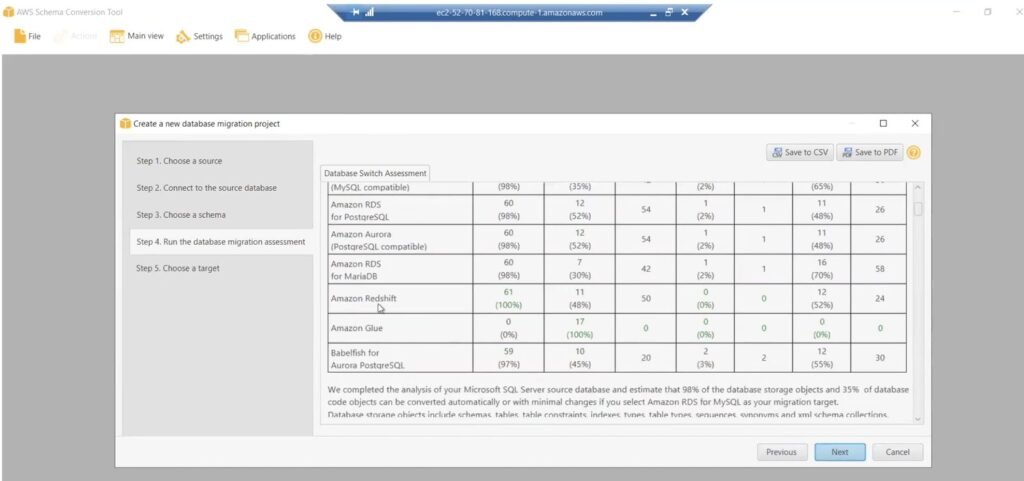
Choosing the target: the database switch assessment. Before converting anything, SCT will assess the source against every plausible target platform at once and tell you what each one would cost in conversion effort. That single screen is how the target engine gets argued with numbers instead of preference.
For this SQL Server source it reported roughly 98% of storage objects (schemas, tables, constraints, indexes, types and sequences) converting automatically or with minimal changes on both RDS for MySQL and Aurora MySQL, but only 35% to 36% of code objects such as triggers, views, procedures and functions, leaving 56 complex conversion actions. The PostgreSQL-family targets scored better on code at around 52%, Redshift converted 100% of storage objects, and Babelfish sat in between. Aurora MySQL was taken for operational fit, with the code-object gap accepted and planned for up front rather than discovered halfway through a wave.
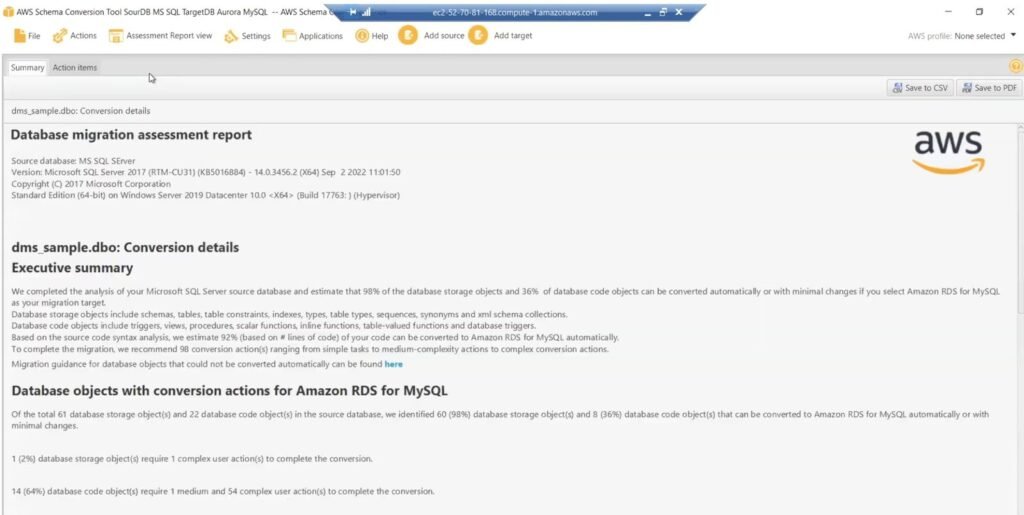
The assessment report. With source and target connected, SCT produces the database migration assessment report, which is the most useful artefact of the whole conversion stage. The executive summary states the position plainly: of 61 storage objects and 22 code objects in the source, 60 storage objects and 8 code objects convert automatically or with minimal changes; 1 storage object needs a complex user action; 14 code objects need 1 medium and 54 complex actions; and around 92% of the code, measured in lines, converts on its own.
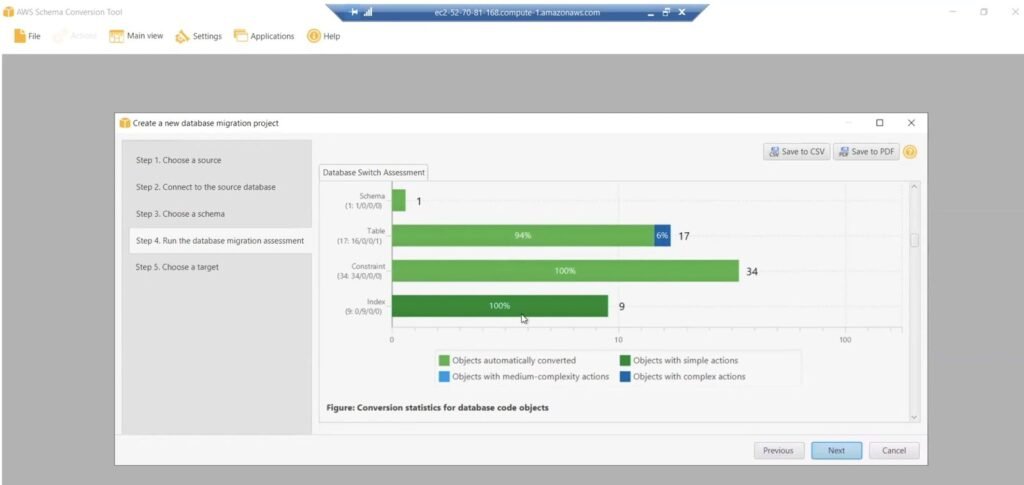
Underneath that, the conversion statistics break the estate down by object type, with schemas, tables, constraints and indexes converting at 94% to 100% and the remainder flagged as simple, medium or complex actions. The Action items tab then lists every one of them individually. Green items are safe to leave to the tool. Everything else is a named piece of work that needs an owner and an estimate.
What the report is actually good for. It is easy to read it once, note the headline percentage and move on. In practice it earned its place four times over:
It has a limit worth stating plainly, though: the report estimates convertibility, not behaviour. It will not tell you that a query plan degrades on the new engine, that a collation change alters sort order, or that an implicit type conversion now rounds differently. Those only appear once data is actually moved and queried, which is precisely the job wave 0 exists to do. Re-running the assessment after each round of remediation is worth doing in its own right, too, because a shrinking action-item count is one of the few honest progress metrics a migration has.
How it feeds the wave plan. This is the join between the two halves of the project. The action-item count per schema is the effort axis of the wave-planning grid: a schema with 60 automatic objects and no complex actions is a quick win, while a schema carrying 54 complex code actions is high effort no matter how small its tables are. Running SCT early, against the pilot and reference-data schemas first, turns wave estimates from opinion into a countable backlog, and it surfaces the awkward objects while there is still time to rewrite them rather than on the night of a cutover.
Why it matters: The assessment report converts a vague “migrate the database” ask into a countable backlog of objects, which is what makes wave estimates defensible.
With the schema in place, the DMS side is built in three parts.
The replication instance. The instance class is chosen for the volume and velocity of the wave, placed in the VPC on private subnets with public accessibility unticked, and set to Multi-AZ for production workloads. It takes several minutes to provision, so it is built well ahead of the task.
The endpoints. A source endpoint and a target endpoint, each with server name, port and credentials. Credentials are pulled from AWS Secrets Manager rather than typed into the endpoint, and the target endpoint is given a service access role ARN with the permissions it needs to write. Both connections are tested from the replication instance before going any further, because an endpoint that tests green here saves hours of task-level debugging later.
The migration task. The instance and endpoints are selected, then the migration type: full load plus ongoing replication. Two settings matter more than the rest:
One preparation step on the target is easy to miss: drop the foreign keys before the load. DMS copies tables in parallel rather than in dependency order, so a constraint will reject perfectly valid rows simply because the parent row has not landed yet. The keys go back on after the full load completes and before cutover.
CloudWatch logging is enabled on the task, and the premigration assessment is left unticked because SCT has already covered that ground. From there the status moves from created to starting, which is the task connecting to the replication instance and both endpoints, then to running, then to load complete with replication ongoing.
Choosing the replication instance class, and what it implies. The replication instance is not a database. It is a managed host that reads, buffers and writes on your behalf, and the class decides how much of that buffering happens in memory rather than on disk. The families behave very differently:
The implications are worth spelling out. Memory sizing effectively sets how many tasks the instance can carry at once, which is why the number of concurrent tasks, rather than the size of the largest one, is the sizing question. Instance storage holds cached transactions and task logs, so a task that falls behind burns disk as well as memory. LOB handling is the other lever: limited LOB mode is materially faster than full LOB, at the cost of truncating anything above the limit you set, so that limit has to be a deliberate number. And while the class can be changed later, doing so restarts the instance and every task on it, which makes it a maintenance window rather than a slider.
Where it sits in the VPC. The instance is placed through a replication subnet group, the DMS equivalent of a DB subnet group, which requires at least two subnets across two availability zones. Both subnets are private and publicly accessible is left unticked, so the instance has private addressing only and nothing routes to it from the internet. Under Multi-AZ the standby sits in the second subnet and takes over without the endpoints changing.
Traffic then runs in three directions. Out to the on-premises source over Direct Connect or the Site-to-Site VPN. Across to Aurora without ever leaving the VPC. And up to the AWS services it depends on, meaning Secrets Manager for credentials, KMS for keys, CloudWatch Logs for task logs and S3 for the archive, which goes either through a NAT gateway or, better, through VPC interface endpoints so that traffic stays on the AWS network. DMS creates its own elastic network interfaces in those subnets, so it is worth leaving headroom in the CIDR before a wave doubles the task count.
Securing it. One structural advantage of a replication instance is that there is no operating system to look after, because you cannot log into it, so hardening is entirely a network and IAM exercise:
Why it matters: Most first-run DMS failures are not DMS problems. They are an untested endpoint, a foreign key on the target, or a task told to create tables that already exist.
Nothing of this size moves in one go. The estate was broken into waves ordered by dependency first and business risk second, so that the riskiest data moved on a pattern that had already been proven twice.
| Wave | Contents | Why here |
|---|---|---|
| 0 · Pilot | Archived and historical data with no live consumers | Proves the DMS and CDC pattern, the SCT action items, the reconciliation queries and the cutover runbook at zero business risk. |
| 1 · Reference data | Instruments, products, periods, venues, counterparties | Low volume and slow changing, but it is the dimension layer everything else references, so it has to land first. Type and collation issues surface here, so validate exhaustively. |
| 2 · Market data | Order book, aggregates, forward and settlement prices | High volume and high velocity, so this is what stresses replication instance sizing, partitioning and CDC throughput. Largely reproducible, so a moderate SLA. |
| 3 · Trades & orders | Executed trades and order events | Integrity critical and regulated, with zero tolerance for data loss. Cut over away from month end and settlement, with rigorous reconciliation. |
| 4 · Derived & regulatory | Positions, P&L, risk, regulatory reporting feeds, dashboards | Consumes everything above it, so it migrates last. It also carries the highest visible SLA, so cutover is coordinated with the desk. |
Underneath the dependency order sits a simple prioritisation grid: high value and low effort first as the quick wins, then high value and high effort, then low value and low effort, and finally low value and high effort, which is often the honest place to ask whether the workload should be migrated at all.
Deciding what belongs in which wave is an assessment exercise before it is a technical one. Google Cloud’s migration-wave guidance groups the criteria into three buckets, and they transfer cleanly to a database estate: application architecture, business considerations and IT operations.
Scored that way, every workload lands somewhere on a grid of business value against effort to implement, and the waves fall out of the grid rather than out of an argument. The quick wins go first and prove the pattern, the high-value and high-effort work goes second while the team is warm, and the low-value work goes last, where the honest question is whether it should be migrated at all. (The diagrams above are my own, following the wave-planning framework in the Google Cloud Migration Center documentation.)
What runs once, and what runs continuously. This is worth being precise about, because it drives the whole schedule. SCT is a one-time job per wave: convert the schema, work through the action items, apply it to the target, and it is done. The DMS full load is also one-time, being a single batch copy of everything in that wave as at the moment it starts. CDC is the only part that runs continuously, replaying every insert, update and delete made on the source from the end of the full load right up to the moment that wave cuts over, and only for as long as that wave still needs it. Because waves cut over at different times, several CDC tasks run in parallel across the programme, which is exactly why the replication instance is sized for the number of concurrent tasks rather than for the largest one on its own.
Why it matters: Wave 0 is the one people try to cut for time. It is also the only wave where you can get the runbook wrong for free.
Cutover is where a migration becomes a business decision rather than a technical one. Four patterns were on the table:
This estate ran the online pattern with a blue-green switch. Full load plus CDC brought the target level, replication was left running until the source and target agreed, and the final move was a connection repoint made outside trading hours. The source was kept intact and synchronised as the rollback path for an agreed window after each wave, and only decommissioned once the wave was signed off.
Why it matters: The rollback plan is the part of the cutover you hope to waste. Agree the window, and who calls it, before the task is stopped.
Two questions run in parallel through every wave: is the data right, and is the pipeline healthy.
Is the data right. Row counts on the source against the target, table statistics inside the DMS task showing inserts, updates and deletes applied, and a set of reconciliation queries written per wave. That means checksums and control totals on the columns the business actually reports on, not just a count of rows.
Is the pipeline healthy. CloudWatch metrics on the replication instance, watching freeable memory and swap usage in particular. Memory pressure on a replication instance is the classic symptom of an instance running more tasks than it was sized for, so when swap starts to climb the first question is how many tasks share that instance, and the answer is either to resize it or to split the tasks. CDC source and target latency show whether the target is keeping pace, and the task log goes to CloudWatch Logs for anything the console does not surface.
When the delta is fully applied and the reconciliation passes, replication is stopped deliberately from the task actions menu. The source is still receiving changes right up to that point, so stopping the task is the cutover moment.
Why it matters: Replication lag and memory pressure are the two metrics that tell you a cutover window is at risk while there is still time to do something about it.
Encryption on a migration has two layers, and they are easy to conflate.
In transit. Both DMS endpoints are set to use SSL/TLS, so source to DMS and DMS to target are encrypted. The link itself is a separate question, and one nuance is worth knowing: Direct Connect is private but not encrypted by default. If you need encryption over it you either run an IPsec VPN across the Direct Connect link or use MACsec on supported ports. A Site-to-Site VPN, by contrast, is IPsec-encrypted out of the box.
At rest. KMS encryption on the Aurora target with a customer-managed key, and SSE-KMS on the S3 archive bucket. The catch on Aurora is timing, because encryption has to be enabled when the cluster is created. You cannot switch it on for an existing unencrypted cluster in place. Instead you take a snapshot, copy that snapshot with encryption enabled against your key, and restore a new cluster from the encrypted copy. On a migration that is easy to get right, because you create the target encrypted from the start and DMS simply writes into it, with the storage layer doing the work and nothing special required on the DMS side.
The mental model I kept coming back to when people mixed these up:
Why it matters: “It is on Direct Connect so it is encrypted” and “we will turn on KMS afterwards” are the two assumptions most likely to fail a security review late.
Once the source is no longer needed as a live fallback you stop paying to run it, but you do not necessarily delete the data. The source is extracted to S3 as Parquet, catalogued in AWS Glue and tiered to Glacier Deep Archive: cheap, durable, still queryable cold storage.
This is retention, not rollback. It is not a runnable database and it is not there for the migration team. It exists for audit, reconciliation and regulatory obligation, and the retention period is driven by compliance rather than by the project, since trading records typically carry multi-year obligations.
It is worth separating from two other things it gets confused with. The Aurora target has its own automated backups, snapshots and point-in-time recovery, which is recovery, meaning the restoration of a corrupted or deleted state. Multi-AZ is availability, meaning failover if an availability zone is lost. A production target has both, and neither of them is the archive.
Why it matters: Decommissioning the source is the step that realises the saving. Having the archive in place first is what makes it possible to sign off.
Not every migration needs SCT. Where source and target run the same engine, Oracle to Oracle on RDS for example, the schema converts to itself and the pattern changes to a bulk export plus CDC catch-up.
The export is taken with Oracle Data Pump and moved through S3 using the RDS S3 integration: add the S3_INTEGRATION option to the instance option group and attach an IAM role with s3:ListBucket, s3:GetObject and s3:PutObject. That combination is enough on its own, because the managed integration works from a private subnet with no NAT gateway and no S3 endpoint, since the download is performed by the RDS service rather than by your instance. The dump files are then imported with the DBMS_DATAPUMP API, and the task log is read back through a stored procedure.
The join between the two halves is the SCN captured at export time. DMS is started as a CDC-only task from that point, so it replays exactly the changes made since the dump was taken and no more. One tuning note from this path: limited LOB mode is materially faster than full LOB mode, so it is worth knowing your largest LOB size and setting the limit deliberately rather than defaulting to full.
Why it matters: Homogeneous does not automatically mean simpler, but it does remove the conversion backlog, which is usually the largest unknown in the plan.
Why it matters: The tooling here is standard. The difference between a smooth migration and a painful one sits almost entirely in sequencing and preparation.